


My S3 site won't load over HTTPS on my domain
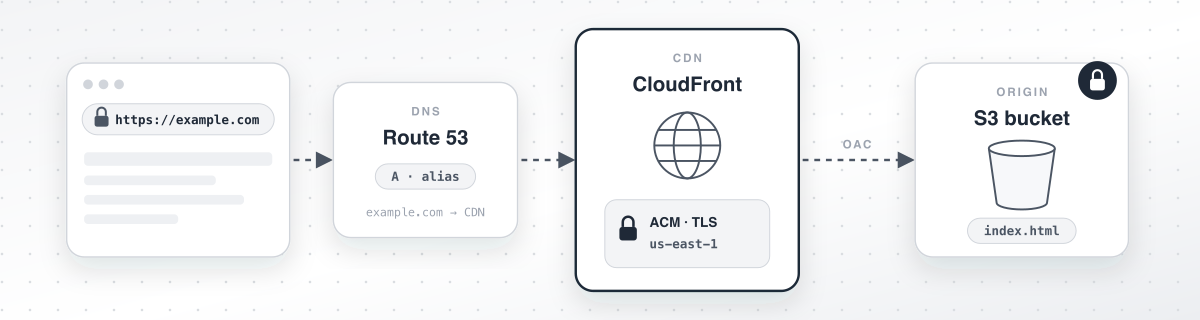
The bucket has the site, the certificate exists, and the DNS record is in place, but the domain won't load. There's almost always a missing piece between the domain and the bucket.
A real case
A re:Post user had a bucket with a static site, a CloudFront distribution, a certificate, and a Route 53 record. The CloudFront URL loaded, but their domain didn't. The accepted answer changed two things: naming the bucket without dots, and turning off S3 static website hosting so CloudFront uses the bucket as its origin. See the thread.
Why the website endpoint doesn't work
The S3 website endpoint doesn't support HTTPS. The documentation recommends CloudFront or Amplify if you need HTTPS. S3 website endpoints. That's why the domain must point to CloudFront, and CloudFront must read the bucket as its origin.
What needs to exist
- A bucket with the built site, with
index.htmlat the root. - A CloudFront distribution with that bucket as its origin. So that only CloudFront can read the bucket, use Origin Access Control. Restrict access to S3 with OAC.
- An ACM certificate issued in
us-east-1. The documentation says that for HTTPS between viewers and CloudFront, the certificate must be in that region. CloudFront HTTPS requirements. - A Route 53 alias A record pointing your domain to the distribution.
The order to set it up
First create the bucket and upload the site. Then create the distribution with the bucket as its origin and OAC turned on. In the distribution, add your domain as an alternate domain name (CNAME) and attach the us-east-1 certificate. Finally, create the alias in Route 53.
If your site is a single-page app, set up custom error responses for 403 and 404 that return /index.html. Without that, reloading an internal route fails.
The domain without www
Most providers don't allow a CNAME at the root of a domain. For yourdomain.com use an alias A record, and for www.yourdomain.com you can use a CNAME or an alias. In Route 53 both are aliases to the same distribution.
Redirecting between www and the root domain
Pick a single place to do the redirect: the DNS, a second bucket, or a CloudFront function. If you mix two, the browser can bounce between them and load nothing.
Common errors
| What you see | Likely cause |
|---|---|
| The certificate doesn't show up when creating the distribution | It's in another region. It must be us-east-1 |
| The domain is already in use when you assign it | Another distribution has it. Remove it from there first |
| 403 error when opening the site | The bucket doesn't let CloudFront read it. Check the OAC policy |
| You see the old version | CloudFront's cache. Create an invalidation |
On caching, CloudFront explains that an invalidation removes the file from the edge servers, and the next time someone requests it, the new version is fetched from the origin. CloudFront invalidation.
What C4C7OPS does about this
In Frontends you choose to publish as dynamic (SSR) or as static on S3 with a CDN. If the domain is already set up, the platform creates the route and HTTPS. Environment variables are managed per environment.
Frequently asked questions
Why can't I put a CNAME on my root domain? A CNAME at the root conflicts with other records the domain needs, such as the mail records. That's why an alias A record is used, which works at the root in Route 53.
Why does the certificate have to be in us-east-1? Because CloudFront requires it, even if your application runs in another region. The CloudFront documentation cited above says so.
I made changes and still see the old version. What do I do?
Create an invalidation for the files you changed, or for all of them (/*), and wait for it to finish.
Your static site still won't load over HTTPS?
Tell us about your case.
Sources
You may also be interested
 Cloud
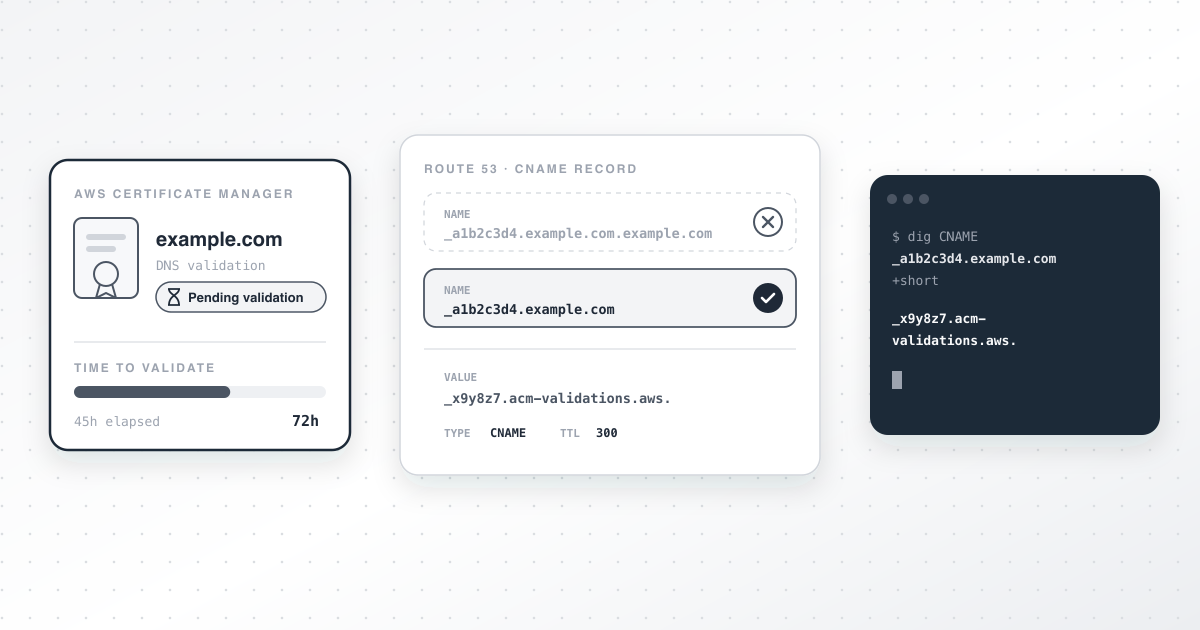
My ACM certificate is stuck in Pending validation
Almost always the CNAME record is misspelled or sits in a DNS zone nobody queries. This is what we check, in this order.
 Cloud
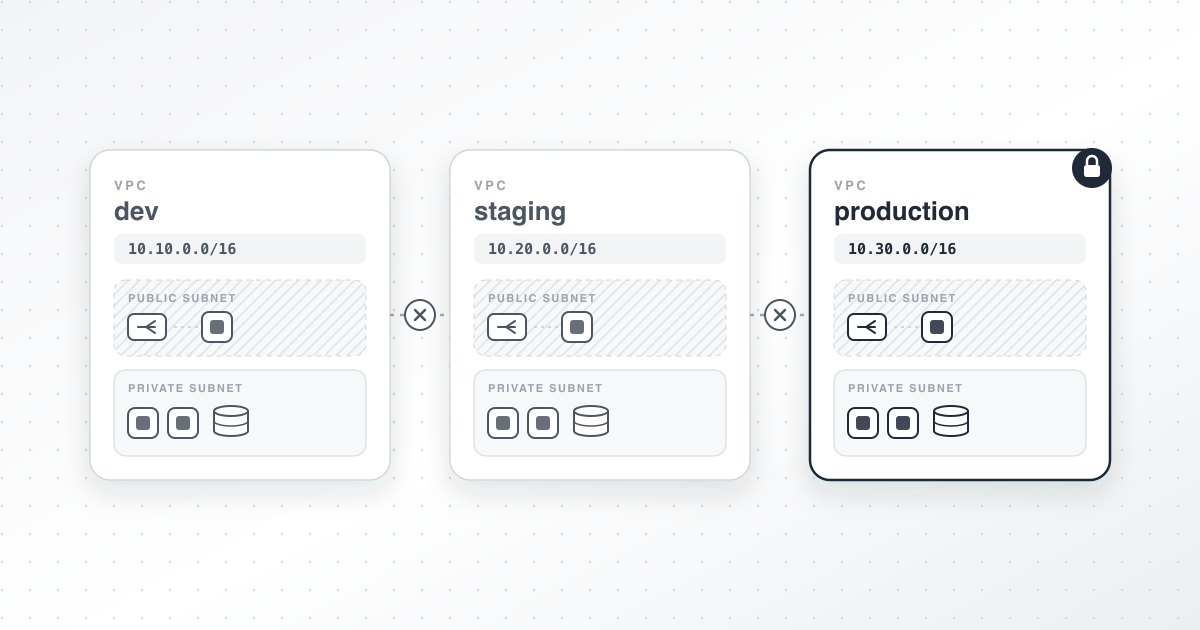
One VPC for all your environments, or one for each
If dev and production share a network, a misconfigured test can reach real data. Here's what to decide before you create anything.
 Cloud
How to create infrastructure and deploy it on C4C7OPS.
The goal of this post will be to create an infrastructure project, in this case we will use terraform and C4C7OPS. Some of the things we can achieve by implementing infrastructure projects in our cloud are the following: - Creation of an EC2 Instance in AWS - Deployment of a Web Application on Google Cloud - Configuration of a Virtual Network in AWS - Implementation of a MySQL Database Cluster on GCP - Automation of Data Backups with Terraform and AWS Backup To implement any of these projects, we will need to follow these steps: